Fun With Light Sensors
In our living room we have several very large windows that can let in a lot of light. We also have some lights with either LIFX bulbs or Z-Wave switches that we can control via Home Assistant. It seemed like a no-brainer to try and make a system to auto turn the lights on or off depending on the amount of light in the room. On overcast days, or during the winter when it isn’t light until 7:30am, we could have the lights turn on when we wanted them to and off again when the sun provided enough light in the room. With this very simple idea in mind I jumped down the rabbit hole of complications as our family started to run in to all the edge cases.
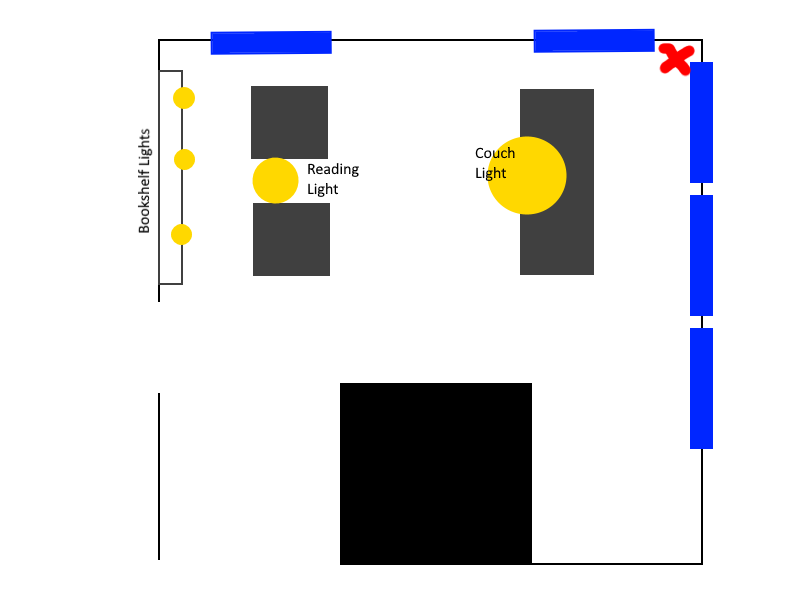
For reference, here is a basic diagram of our living room. There are 5 windows around the edge and 3 lights which labeled Couch Lights, Reading Light and Bookshelf Lights. In this project I’ll be controlling all of them, but under different circumstances and at different times.
The heavy lifting on the automation side is being done with ESPHome, light sensor compatible with ESPHome, and Home Assistant.
Building Custom LibreELEC Images
We use Kodi for a lot of our media center needs in our house. We have several TVs, each with their own Kodi box, configured to pull information from a centralized database and shared network storage. To run Kodi I’ve used pre-made LibreELEC images. LibreELEC is “just enough OS” system that is designed to run Kodi within a stripped down Linux OS designed just for that purpose. It also layers in some additional patches and features that make the whole experience easy to work with.
I’ve also been following work on Kodi’s RetroPlayer project. This is an integration with Kodi and the excellent RetroArch system for game system emulation. Out of the box Kodi has many RetroPlayer features built in; but the RetroPlayer project is often well ahead of what Kodi has merged into it natively. For a long time I was able to hunt down LibreELEC builds that included these enhancements but I’ve been having a hard time with that lately. I’ve decided to tackle building my own custom LibreELEC builds that incorporate the latest RetroPlayer releases.
Custom Home Assistant Energy Sensor
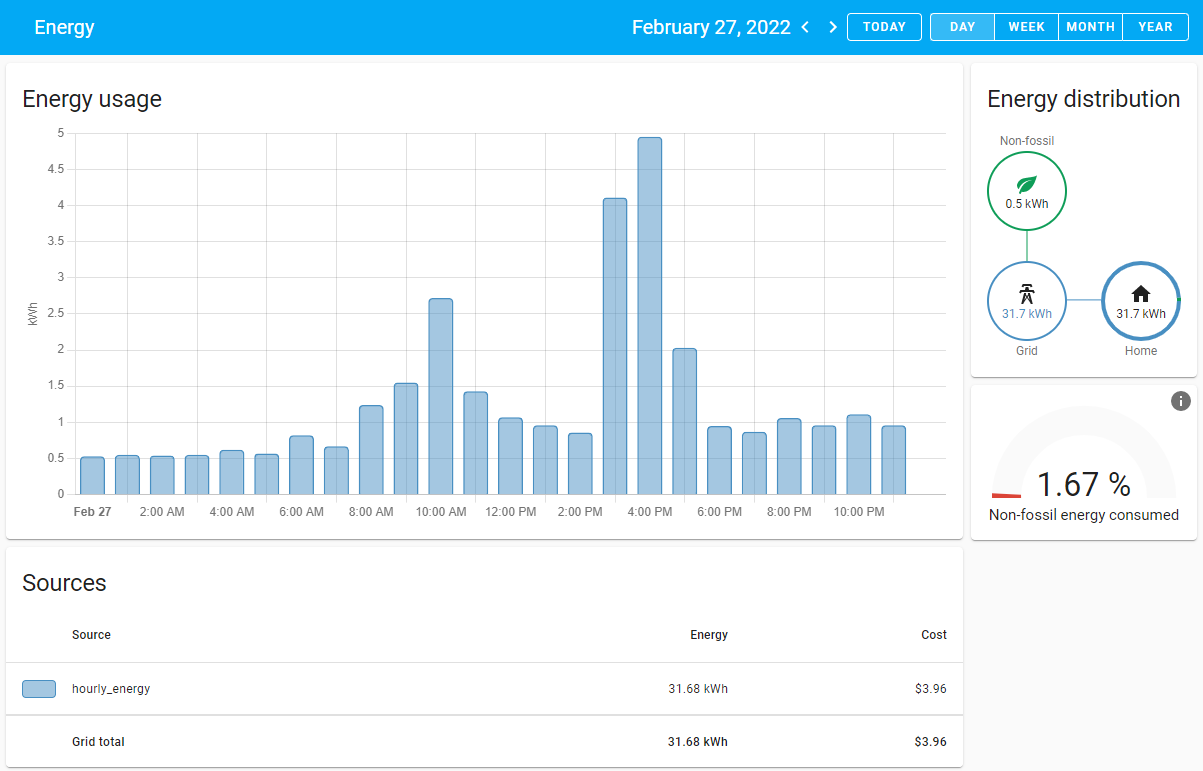
The Energy Management section of Home Assistant is very powerful. It allows you to visualize both consumption and generation (if available) of electricity in your home. In addition to whole home energy monitoring you can also setup individual devices within the system that are capable of capturing usage information. In my home I have a small UPS that provides backup power for all my home lab equipment. This includes my home camera system, NAS, wifi access points; basically all the main network components of my home. I wanted to see if it was possible to get usage information from this device into Home Assistant and see how much electricity it’s using compared to the rest of my home.
EPD Image Processing
This is mostly a reminder for myself but perhaps could be useful for others in the same boat. In short, image processing is a pain. This is especially true when dealing with devices, like e-ink displays, that use limited color sets. Black and white conversions are fairly easy to deal with but as soon as you start adding multiple colors things can get tricky.
Below are some of my notes on dealing with Tri-color Waveshare devices and how to process the images. For reference I’ll be using code from my omni-epd project, which implements these image processing methods. The library used throughout is the excellent Pillow image processing library. If you want to play with any of these methods I’ve written a filter script that can both filter an image based on a given palette, or save the colors separate as shown below.
Home Lab Backups
For as long as I can remember I’ve always been really paranoid about losing data. When Windows XP was brand-spanking new it was having two hard drives in my PC; in college I cobbled together a RAID system from an old Intel 3 tower and now it’s pushing files to dedicated NAS hardware or in the cloud. I’m also sort of lazy; at least about re-doing work I’ve already done before. While Git repositories work great for my coding projects there are a lot of other things that need redundancy as well. With that in mind I’ll highlight a few things I do to try make sure I can recover systems when I need to.
There are hundreds of different ways you could set this kind of thing up but this is what works for me. If you just want the list of software jump right to the links.
First Post
First posts to a blog are always kind of pointless so I’ll keep this one short and quick. GitHub provides a way to quickly deploy a personal blog site so I thought I’d take advantage of it. Mostly I want to play around the Jekyll as I’ve never had a chance to do that before. Almost secondary I wanted a place to document some random thoughts related to various GitHub projects that I either own or contribute to. Having a space to explain certain design decisions, discussions had, or just code I find interesting would be helpful so I thought this would be a good place to do that.
As of this post my skills with Jekyll are pretty limited so expect the design and navigation on this site to pretty horrible for a while. I’m definitely not a designer so form is secondary to function for sure. As I find ways to make it better I’ll see if I can at least make this useable for the average person.