
This is the first of a two-part post. Part 1 is standalone and details everything done with basic Home Assistant components. Part 2 goes beyond and explains the training of a custom image model to detect if trash bins are present in the camera frame.
I’m constantly adding little tweaks to our smart home through Home Assistant; but it’s been a while since I’ve had anything more complicated than adding a quick automation. Recently however I decided to tackle the problem of the dreaded trash day reminder. The problem is familiar to anyone that has residential garbage service that collects on a schedule. There are times when you just forget to put the trash or recycling out, or even worse the day shifts to accommodate a holiday. Ideally a system would exist that would just remind you, correctly and unobtrusively. Unfortunately that kind of system isn’t available out of the box.
For a long time I’ve used a custom HACS integration to get the pickup date for my trash hauler. While it worked, it did not work reliably when the trash day was shifted. The problems were not on the part of the maintainer but on the part of the trash hauler. While I do get emails when pick up service is changed, they don’t take the initiative to actually update the date via their scheduler. Since the custom integration pulls from their system, the date was just never right. I decided that even though it would take some manual effort on my part, I could make it work better.
Table of Contents
The Workflow
I decided to create a calendar for the trash service schedule that I would modify as needed when the date shifted. Since the hauler is good about updating via email I can quickly make the date shift on my phone and have it reflected on the calendar. A bit of manual effort but getting notified on the right day would actually happen. As a bonus this would easily be visible to other family members if I’m not home. My other requirements were:
- Create a countdown for how many days until the next trash pickup
- Show a visible notification on the dashboard the night before
- Ignore if we’re on vacation or otherwise known to be not at home
- Feedback mechanism (ie, boolean helper) to designate if the trash has been put out
- As a bonus could I utilize AI to detect when the trash was taken out vs taking an action to confirm it was done? This will be detailed in part 2
While a push notification or broadcasted voice message would be possible I didn’t go that route. Personally I think a dashboard alert is just better in this case.
Calendar Setup
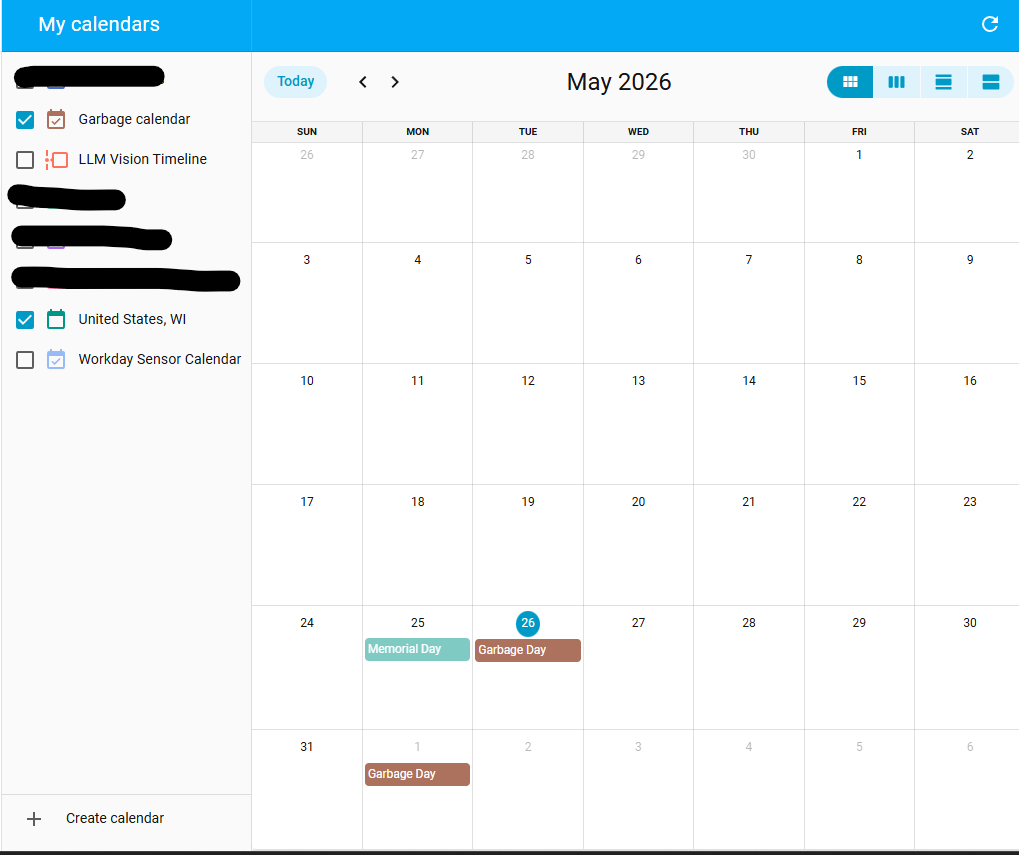
For the calendar setup I decided to use a Google Calendar. I’m already pulling these in for personal use and creating another one was pretty easy. You could use any kind of Calendar integration here, even just a local HA one. From the Google perspective I created a new calendar in my Google account and named it “Garbage”. I then setup the recurring schedule - which is Monday for us. Since these are the only events on this calendar the current, or next, event is always the right one. To integrate with Home Assistant I added the calendar ID and made sure to tell it to ignore availability. This setting ignores free/busy flags and treats any event as an active event. Checking the Home Assistant calendar confirmed it was pulled in properly and showed the trash pickup date on the right day.
Sensor Setup
For the notifications and tracking I needed three more components:
The number sensor is to calculate and store the number of days until the next trash pickup date. While this can be done by utilizing the time_until Jinja function, I didn’t do it this way. The time_until function will always return the smallest unit (days, hours, minutes) and I need this value to always be in days. The following template pulls in the start date for the event from the calendar and calculates the number of days until that event. If today is trash pick up, the number should be 0.
template:
  - sensor:
    - name: "Days Until Trash Pickup"
      state: >-
        {% set Today = as_timestamp(now()) %}
        {% set GarbageDay = as_timestamp(state_attr('calendar.garbage_calendar', 'start_time')) %}
        {{ ((GarbageDay - Today)/86400) | round(0, 'ceil') }}
      unit_of_measurement: 'Days'
As the number of days until the next pick up counts down, I needed a trigger to toggle the dashboard notification. I only really need to know the day before, or the day of, the trash pickup. Any earlier and it’s just annoying. The next template is a simple binary sensor that turns on when less than 2 days (ie, the day before) from the next pickup. This sensor is also where I integrated the vacation check. We use a separate input boolean that triggers either manually or when we’re more than 50 miles away to activate Vacation Mode automations. When this is on the trash notification will be hidden.
A plus to this method versus just checking if days_until < 2 is that I can add the vacation check or modify the number of days out without having to hunt down everywhere this value is used.
template:
  - binary_sensor:
    - name: "Notify Trash Pickup"
       state: "{{ states('sensor.days_until_trash_pickup') | int(5) < 2 and is_state('input_boolean.vacation_mode', 'off') }}"
Finally, I created a input boolean helper as a feedback mechanism for when the trash cans have been set out. On means the trash cans are currently out and Off means they haven’t been put out yet. This could be toggled manually, via an NFC tag, or automatically with image detection. In part 2 of this post I’ll detail trying to go full automated with the image detector.
Notifications and Automations
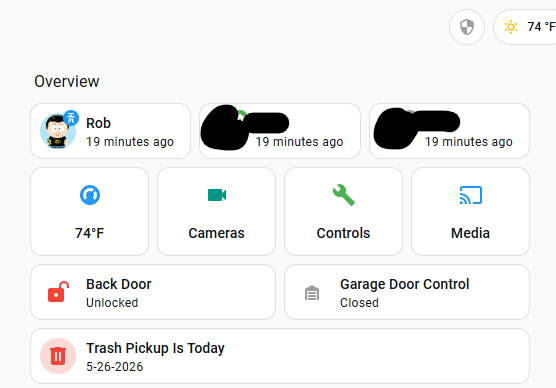
To complete the main components the sensors and boolean helper are set up on the Home Assistant dashboard and in an automation. The dashboard component is pretty easy. I’m using a Mushroom Template card here but there are a lot of custom cards that will give similar features. The card is setup to only show when the Notify Trash Pickup sensor is on and the trash input boolean is off. This ensures it goes away once I’ve set the cans out. For a visual prompt I’ve also added custom coloring based on how close the Days Until Trash Pickup date is. If today is the pickup day the notification is red, otherwise it’s orange. Clicking the notification allows me to toggle the input helper.
type: custom:mushroom-template-card
primary: >-
  Trash Pickup Is {{ 'Today' if is_state('sensor.days_until_trash_pickup', '0')
  else 'Tomorrow' }}
secondary: >-
  {% set trash_date = as_datetime(state_attr('calendar.garbage_calendar',
  'start_time')) %}

  {{ trash_date.month }}-{{ trash_date.day }}-{{ trash_date.year }}
icon: mdi:trash-can
badge_icon: ""
badge_color: ""
entity: input_boolean.trash_set_out
tap_action:
  action: more-info
hold_action:
  action: none
double_tap_action:
  action: none
color: "{{ 'red' if is_state('sensor.days_until_trash_pickup', '0') else 'orange' }}"
features_position: bottom
grid_options:
  columns: full
visibility:
  - condition: state
    entity: binary_sensor.notify_trash_pickup
    state: "on"
  - condition: state
    entity: input_boolean.trash_set_out
    state: "off"
The only automation is for resetting the input boolean helper. Using a normal calendar automation, triggered when the calendar entry goes from on to off ,the input will always be ready for the next weekly event. If you wanted push notifications the exact same type of automation could be used to trigger before the start of an event, like one day in advance.
Status So Far
At this point I had a fully functional system. The calendar would designate the next pick up day, triggering the days to pickup countdown, and displaying the notification when necessary. When reminded, I bring out the trash bins and toggle the boolean to indicate the task is done.
As a bonus feature I wanted to eliminate the manual toggle. Not only would this eliminate the extra effort of remembering to set the toggle (nothing worse than glancing at Home Assistant in the morning, thinking the bins were forgotten when really I forgot to set the input); but it would also be fun. I’ll detail training an image classifier utilizing our outdoor cameras in the next post.
Links
- Calendar Integrations - a list of Home Assistant calendar integrations that can be used
- Calendar Automations - how to setup various automations based on calendar entries
- Mushroom Cards - A useful custom card for displaying data from multiple sensors with a template